How to Create AI Red Portrait DP Photos: Complete Guide to Making Viral Red Theme Profile Pictures
Introduction: The Rise of AI Red Portrait DP Photos
In the world of social media, your profile picture is often the first thing people notice. Whether you are building a personal brand, growing a creator account, or simply upgrading your online identity, a unique display picture (DP) can make a powerful impression.
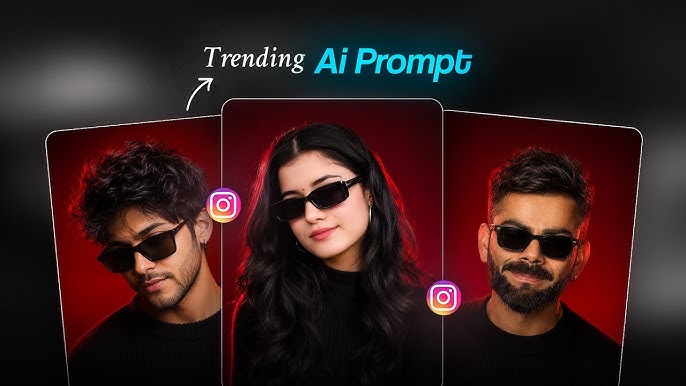
Recently, AI-generated red portrait DP photos have become extremely popular across platforms like Instagram, TikTok, Facebook, WhatsApp, and X. These portraits combine artificial intelligence, cinematic lighting, bold red color effects, and professional photography styles to create eye-catching profile images.
The red portrait style is known for its dramatic appearance, luxury feel, and modern digital-art look. Many creators use these AI portraits because they look like professional studio photos without needing expensive cameras, lighting equipment, or editing skills.
In this complete guide, you will learn how to create AI red portrait DP photos step by step, including choosing the right photo, writing powerful AI prompts, selecting tools, improving quality, and creating a professional-looking final result.
What Is an AI Red Portrait DP Photo?
An AI red portrait DP photo is a digitally enhanced profile picture created using artificial intelligence tools. These tools transform a normal selfie or portrait into a high-quality image with specific visual effects.
A typical AI red portrait includes:
- Deep red cinematic lighting
- Professional studio background
- High-quality facial details
- Dramatic shadows
- Fashion-style appearance
- Sharp focus
- Luxury photography effects
Unlike traditional photo editing, AI can completely redesign the atmosphere of an image while keeping the person’s identity recognizable.
For example, a simple selfie can become a portrait that looks like it was captured during a professional fashion photoshoot with red neon lighting and cinematic effects.
Why AI Red Portrait DP Photos Are Trending
The popularity of AI red portrait images is growing because people want unique and creative ways to represent themselves online.
1. They Look Professional
AI tools can create results similar to expensive photography studios. With the right prompt, you can achieve magazine-style portraits, cinematic images, and premium profile pictures.
2. They Increase Social Media Presence
A creative profile picture can help your account stand out. A bold red portrait creates curiosity and attracts attention.
3. No Professional Equipment Needed
You do not need:
- DSLR cameras
- Studio lights
- Professional photographers
- Advanced editing software
AI tools can create impressive results from a simple uploaded image.
4. Easy Customization
You can change:
- Background style
- Lighting
- Clothing
- Mood
- Camera angle
- Artistic style
This allows you to create different versions of your identity.
Step 1: Choose the Right Photo for Your AI Red Portrait
The quality of your final AI portrait depends heavily on the image you upload.
Follow these tips:
Use a Clear Face Photo
Choose a photo where:
- Your face is visible
- The image is not blurry
- Lighting is good
- Your facial features are clear
AI works better when it can understand facial details.
Avoid Heavy Filters
Do not use photos with extreme filters because AI may struggle to recognize your natural features.
Choose a Front-Facing Image
A straight or slightly angled face usually produces better portrait results.
Use High Resolution
Higher-quality images create sharper AI results.
Step 2: Select an AI Image Generator
Many AI image generators can create red portrait DP photos. Popular options include:
- AI image generation apps
- Online AI portrait tools
- Mobile AI editing applications
- Creative AI platforms
When choosing a tool, look for features like:
- Face preservation
- High-resolution output
- Realistic portrait generation
- Custom prompts
- Style control
The best tool is the one that allows you to describe exactly how you want your portrait to look.
Step 3: Write a Powerful AI Prompt
The prompt is the most important part of AI image creation.
A good prompt tells the AI:
- Who the person is
- What style you want
- What lighting to use
- What background to create
- What quality level you expect
A weak prompt may create a random image.
A detailed prompt creates a professional result.
Example AI red portrait prompt:
“Create an ultra-realistic cinematic red portrait of the uploaded person. Keep the exact facial identity and natural features. Add dramatic red studio lighting, dark luxury background, sharp facial details, professional fashion photography style, realistic skin texture, high contrast, 8K quality, modern profile picture style.”
Step 4: Keep Your Face Identity Accurate
One of the biggest challenges in AI portraits is maintaining the original face.
To improve face accuracy:
- Mention “keep the same face”
- Mention “do not change facial features”
- Mention “preserve identity”
- Upload a clear reference image
Example:
“Use the uploaded face exactly. Do not change hairstyle, facial structure, eyes, nose, or identity.”
This helps the AI maintain your original appearance.
Step 5: Create the Red Cinematic Style
The red effect is what makes these portraits unique.
You can add different red styles:
Red Neon Portrait
Style:
- Neon red lights
- Cyberpunk atmosphere
- Dark background
- Futuristic look
Prompt example:
“Red neon cinematic portrait with glowing lights, futuristic city atmosphere, realistic photography.”
Luxury Red Studio Portrait
Style:
- Professional studio lighting
- Premium fashion look
- Elegant background
Prompt example:
“Luxury studio portrait with deep red lighting, premium fashion photography style, elegant cinematic background.”
Dark Red Dramatic Portrait
Style:
- Strong shadows
- Serious expression
- Movie poster feeling
Prompt:
Ultra-realistic cinematic studio portrait of the reference person, dark luxury aesthetic, centered male subject wearing matte black sunglasses and black textured sweater, messy curly wet hair with detailed strands, sharp jawline, trimmed beard, soft confident expression, deep black shadows, intense red rim lighting glowing around hair and shoulders, dramatic red gradient background fading into black, moody low-key lighting, ultra detailed skin texture, premium editorial fashion photography, symmetrical composition, shallow depth of field, soft diffused key light from front, neon red edge glow, high contrast, rich blacks, minimal clean background, modern masculine vibe, luxury Instagram post style, hyper-realistic, DSLR quality, 85mm lens, f/1.8, cinematic color grading, crisp focus on face, studio-quality retouching, realistic reflections on sunglasses, subtle film grain, photorealistic, 8k, vertical portrait composition –ar 3:4 –style raw – -v 6
How AI Red Portraits Help Personal Branding
A profile picture represents your online identity.
For creators and professionals, a strong AI portrait can help create:
- A recognizable brand image
- A premium appearance
- Better profile aesthetics
- Consistent social media design
Many digital creators use AI-generated portraits as part of their branding strategy.
AI Red Portrait DP Ideas for Different Platforms
Use:
- Cinematic portraits
- Fashion styles
- Luxury backgrounds
TikTok
Use:
- Trendy AI styles
- Neon effects
- Creative edits
Use:
- Clean professional portraits
- Simple red backgrounds
YouTube
Use:
- Creator-style portraits
- Strong facial expressions
Future of AI Portrait Photography
AI portrait creation is changing how people create digital images.
In the future, AI will make it easier to create:
- Personalized avatars
- Professional branding photos
- Virtual identities
- Digital fashion portraits
Instead of spending hours editing photos, users can generate creative images within minutes.
Conclusion
Creating AI red portrait DP photos is one of the easiest ways to upgrade your online appearance. With the right image, a powerful AI prompt, and a creative style, you can transform a simple photo into a professional cinematic portrait.
The key is keeping your identity accurate while adding impressive visual elements like red lighting, premium backgrounds, and realistic photography effects.
Whether you are a content creator, gamer, professional, or someone who wants a stylish profile picture, AI red portraits provide endless creative possibilities.
For More Details Click Here