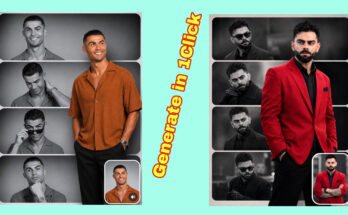
How to Create AI Insta Signature Poster: A Complete Guide to Designing Viral Instagram Posters with Artificial Intelligence
Introduction: The Rise of AI Insta Signature Posters
Social media design has changed completely in recent years. Earlier, creating a professional Instagram poster required advanced graphic design skills, expensive software, and hours of editing. Today, artificial intelligence has made it possible for creators, influencers, brands, and beginners to create stunning visual designs within minutes.
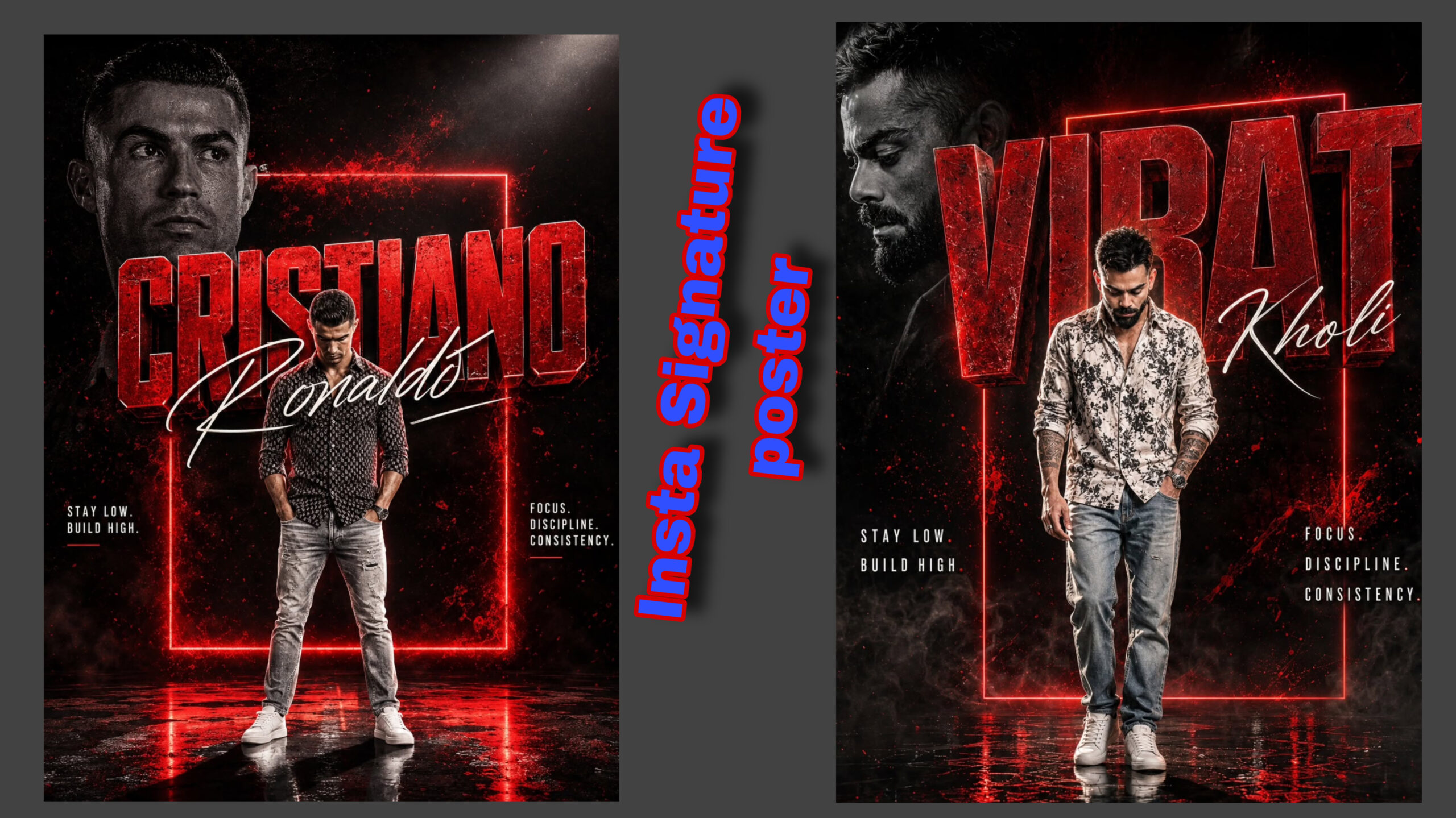
One of the most popular trends among content creators is the AI Insta Signature Poster — a premium-looking Instagram design that combines your personal identity, cinematic visuals, stylish typography, and creative AI-generated elements. These posters are widely used for personal branding, profile upgrades, announcements, reels covers, creator campaigns, and digital marketing.
An AI Insta Signature Poster is not just an image. It is a visual identity that represents your personality, style, and brand. With the right AI tools and creative prompts, you can generate posters that look like they were designed by a professional designer.
In this complete guide, you will learn how to create AI Insta Signature Posters step by step, what tools to use, how to write powerful AI prompts, how to improve quality, and how to create designs that attract attention on Instagram.
What Is an AI Insta Signature Poster?
An AI Insta Signature Poster is a modern digital poster created using artificial intelligence tools. It usually includes:
- A realistic portrait or avatar
- Premium background design
- Personal name or signature style text
- Luxury typography
- Cinematic lighting
- Professional branding elements
- Creative visual effects
The purpose of this type of poster is to make your Instagram profile look more professional and memorable.
For example, creators use AI signature posters for:
- Instagram profile branding
- Creator introductions
- New project announcements
- Personal portfolio designs
- YouTube channel promotions
- Business marketing
- Social media campaigns
Why AI Insta Signature Posters Are Trending
The popularity of AI posters is increasing because they solve many design problems.
1. No Professional Design Skills Required
Traditional poster design requires knowledge of software like Photoshop or Illustrator. AI tools simplify this process by converting simple text instructions into professional artwork.
You can describe your idea, and AI can generate a visual concept based on your description.
2. Faster Content Creation
Content creators need to publish regularly. AI helps reduce the time required to create designs.
Instead of spending several hours designing a poster, you can generate multiple concepts within minutes.
3. Unique Personal Branding
A signature poster makes your content recognizable.
When your audience repeatedly sees your unique style, fonts, colors, and visual identity, they start connecting that design style with your brand.
Best AI Tools to Create Instagram Signature Posters
There are many AI tools available for creating posters. Some popular options include:
AI Image Generation Tools
- Midjourney
- DALL·E
- Leonardo AI
- Adobe Firefly
- Ideogram
These tools can generate creative visuals, backgrounds, and artistic styles.
AI Editing Tools
- Canva AI
- Adobe Photoshop AI features
- Figma AI plugins
These are useful for adding text, layouts, and final adjustments.
Mobile AI Apps
Many mobile apps allow creators to generate posters directly from their phones. They are useful for Instagram creators who want quick results.
Step-by-Step Guide: How to Create AI Insta Signature Poster
Step 1: Decide Your Poster Style
Before using AI, decide what type of poster you want.
Popular styles include:
Luxury Creator Style
Features:
- Dark premium background
- Golden typography
- Cinematic lighting
- Professional portrait
Perfect for:
- Influencers
- Entrepreneurs
- Personal brands
Futuristic AI Style
Features:
- Neon lights
- Digital effects
- Cyber background
- Modern typography
Perfect for:
- AI creators
- Tech pages
- Gaming profiles
Minimal Professional Style
Features:
- Clean background
- Simple text
- Elegant design
Perfect for:
- Business profiles
- Portfolio pages
Step 2: Prepare Your Photo
For the best AI poster result, use a high-quality photo.
Your image should have:
- Clear face visibility
- Good lighting
- Sharp details
- Front-facing angle
- High resolution
Avoid:
- Blurry photos
- Heavy filters
- Low-quality images
A clear image helps AI maintain realistic facial details.
Step 3: Write a Powerful AI Prompt
The quality of your AI poster depends heavily on your prompt.
A good prompt should describe:
- Subject
- Pose
- Style
- Lighting
- Background
- Camera quality
- Design mood
Example:
“Create a premium Instagram signature poster featuring a realistic portrait of a confident creator standing in the center. Add cinematic studio lighting, luxury dark background, modern typography, elegant signature text style, high-end personal branding design, ultra-realistic details, professional photography look, 4K quality.”
Step 4: Add Your Personal Branding Elements
A signature poster should represent you.
Add elements like:
Your Name
Example:
“IBRAR EDITOR”
or
“Your Name”
Use stylish fonts:
- Signature handwriting style
- Luxury serif fonts
- Modern bold fonts
Your Role
Examples:
- AI Content Creator
- Digital Artist
- Video Editor
- Creative Director
This helps people immediately understand your identity.
Personal Logo
A small logo can make the design look more professional.
Step 5: Generate Multiple Versions
Do not create only one design.
Generate different versions:
- Different backgrounds
- Different poses
- Different lighting
- Different typography styles
Compare them and select the strongest design.
Step 6: Improve Your Poster Using Editing Tools
After AI generation, improve the final design.
You can adjust:
Colors
Match colors with your brand.
Examples:
Luxury:
- Black
- Gold
- White
Modern:
- Blue
- Purple
- Neon
Minimal:
- White
- Gray
- Beige
Text Placement
Keep important information visible.
Avoid placing text over the face.
A good layout:
Top:
Brand name
Center:
Portrait
Bottom:
Title or description
Step 7: Export Instagram Ready Size
Instagram has different formats.
Recommended sizes:
Instagram Post
1080 × 1350 pixels
(4:5 ratio)
Best for feed reach.
Instagram Story
1080 × 1920 pixels
(9:16 ratio)
Best for stories and reels promotion.
How to Make AI Signature Posters Look Professional
Use Cinematic Lighting
Lighting creates a premium appearance.
Popular styles:
- Studio lighting
- Golden hour lighting
- Neon cinematic lighting
- Soft shadows
Add Depth
Professional posters usually have:
- Foreground subject
- Background elements
- Blur effects
- Shadow separation
This creates a 3D feel.
Keep the Design Clean
A common mistake is adding too many effects.
Premium designs usually have:
- Simple layouts
- Strong typography
- Balanced spacing
AI Prompt Formula for Better Results
Use this structure:
Subject + Style + Environment + Lighting + Details + Quality
Example:
Subject:
“Professional male creator portrait”
Style:
“Luxury cinematic branding poster”
Environment:
“Modern studio background”
Lighting:
“Soft dramatic lighting”
Details:
“Signature typography, premium design”
Quality:
“Ultra realistic, 8K, professional photography”
Common Mistakes When Creating AI Posters
Mistake 1: Using Weak Prompts
A simple prompt like:
“Make a cool poster”
will not create professional results.
AI needs detailed instructions.
Mistake 2: Ignoring Personal Branding
A beautiful poster without your identity may look generic.
Always add:
- Name
- Theme
- Personality
Mistake 3: Too Many Effects
Prompt:
Create a high-end personal branding Instagram poster using my uploaded photo as the exact identity reference. Keep my face 100% unchanged — same facial features, hairstyle, skin texture, and identity. Do not alter my appearance or create a different person.
Style: Ultra premium cinematic personal branding poster, Behance front-page quality, luxury advertisement design, 4:5 Instagram poster format, ultra realistic 8K resolution.
Main Subject:
A single person standing in the center foreground, full body visible, head slightly down, focused confident silent expression. Wearing a casual patterned shirt, faded denim jeans, and clean white sneakers. Natural confident posture, realistic body proportions.
Background:
Dark cinematic studio environment with deep black tones, dramatic atmosphere, subtle fog, red dust particles, paint splashes, grunge metallic texture, high depth and cinematic mood.
Typography Design:
Replace the original name text with ”{Ibrar Editor}”.
Use massive 3D block typography, distressed metallic material, dark red color, scratched rough texture, 3D depth, edge glow, and strong shadow effects.
Add secondary signature text ”{IBRRA EDITOR}” overlapping the main name using a luxury handwritten signature style, white color, elegant large size.
Composition:
Add a large faded black-and-white portrait of me in the upper left background with high contrast and rim lighting.
Place the main full-body color portrait in the center bottom as the hero subject.
Lighting:
Professional cinematic lighting:
* strong spotlight from top right
* bright rim light around subject
* low ambient lighting
* dramatic shadows
* realistic skin texture
Neon Elements:
Add a glowing red rectangular neon frame behind the subject with strong cinematic glow.
Floor: Reflective glossy surface with wet look, realistic reflection, long cinematic shadow. Extra Effects:
Red paint splashes, floating dust particles, volumetric light rays, cinematic contrast, premium poster finish.
Side Text Elements:
Left side:
“STAY LOW.”
“BUILD HIGH.”
Right side:
“FOCUS.”
“DISCIPLINE.”
“CONSISTENCY.”
Use minimal modern uppercase typography in white. Final Look: Award-winning graphic design, luxury brand campaign style, extreme photorealism, sharp details, high dynamic range, professional poster design.
Negative Prompt: No Instagram UI, no likes, comments, shares, usernames, captions, watermarks, logos, extra people, cropped body, distorted face, changed identity, bad anatomy, blurry text, low quality, pixelation, cheap design, oversaturated colors.
Over-editing can reduce quality.
Professional designs focus on balance.
Mistake 4: Poor Image Quality
Low-quality input images usually create unrealistic results.
Always start with a clear photo.
AI Insta Signature Poster Ideas
Here are some creative ideas:
1. AI Creator Introduction Poster
Design:
- Your portrait
- Your name
- “AI Creator”
- Futuristic background
2. Personal Brand Poster
Design:
- Luxury studio look
- Professional outfit
- Signature logo
3. Motivational Poster
Design:
- Strong portrait
- Powerful quote
- Cinematic background
4. Digital Artist Poster
Design:
- Creative effects
- AI elements
- Modern graphics
SEO Benefits of Using AI Posters for Instagram
A strong visual identity can improve:
- Profile recognition
- Audience engagement
- Brand consistency
- Content appearance
When your posts have a professional style, users are more likely to remember your page.
Future of AI Poster Design
AI design technology will continue improving.
Future AI tools will allow creators to:
- Generate complete brand identities
- Create animated posters
- Produce 3D designs
- Automatically match branding styles
AI will become a powerful creative assistant for designers and content creators.
Conclusion
Creating an AI Insta Signature Poster is easier than ever. With the right AI tools, a high-quality photo, and a detailed creative prompt, anyone can design professional-looking Instagram artwork.
The secret is not only using AI — it is understanding your style, building your identity, and creating designs that represent your personal brand.
Whether you are an influencer, business owner, AI creator, or digital artist, AI signature posters can help you create a stronger online presence and make your Instagram profile stand out.
For More Information Visit